
Contract Management Software: A Complete Guide for Businesses
What contract management software does, how it works, the features and benefits that matter, who should use it and how to choose the right system for your contracts and renewals.
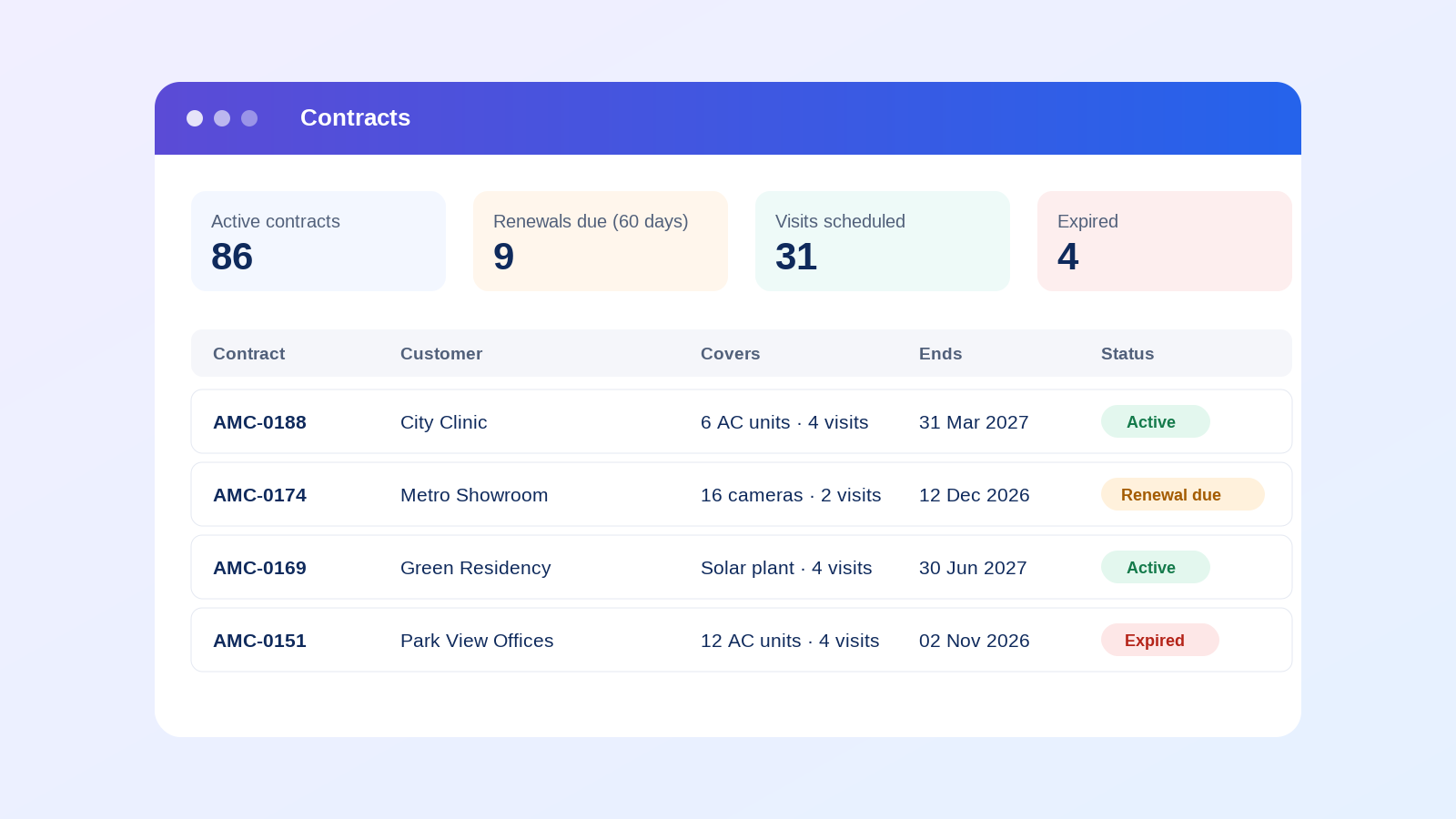
A business rarely has just one contract. There are customer agreements, service commitments, annual maintenance contracts, vendor terms and warranties, each with its own start date, end date and list of promises. In many companies these sit in a mix of spreadsheets, paper files, email attachments and one person’s memory. Contract management software replaces that patchwork with a single, structured record of every agreement, so the business knows what it has signed, what it owes and what is due for renewal.
The cost of the manual approach is usually discovered late: a renewal date that passed three weeks ago, a signed copy nobody can find, or a customer asking about a visit that was promised and never scheduled. This guide explains what contract management software is, how it works, the features and benefits that matter, who should use it and how to choose a product. It is written for business owners, operations managers and service businesses that manage customer contracts, service agreements and renewals.
What Is Contract Management Software?
Contract management software is a digital system that helps a business create, organize, store, track and manage its contracts in one central place. It records who each agreement is with, what it covers, when it starts and ends, what it is worth and what status it is in, and it makes that information easy to search and review.
Business contract management is the wider practice behind the tool: keeping agreements organized from the day they are signed until they are completed, renewed or closed, and making sure the commitments inside them are met. A contract management system is simply the place where that practice lives. You may also see it called agreement management software or a contract management solution; the terms overlap heavily.
The difference between manual and digital contract management is not the contract itself but what surrounds it. Manually, the document is a file in a folder and the important dates sit in someone’s head or in a spreadsheet column. With digital contract management software, the document, the dates, the customer and the status are held together in one record that several people can see, filter and act on.
Why Businesses Need Contract Management Software
Manual methods rarely fail all at once. They fail one contract at a time, as volume grows. These are the problems businesses run into most often.
- Contracts stored across folders and devices: The signed PDF is in one person’s email, the scanned copy is on an office computer and the original is in a filing cabinet. Nobody is sure which version is final.
- Difficulty finding contract information: A customer calls to ask whether a repair is covered. Answering means finding the document and reading it, while the customer waits.
- Missed renewal dates: A one-year agreement signed in March expires the following March. If the date lives only in a spreadsheet nobody opens, the renewal conversation starts after cover has already lapsed.
- Difficulty tracking contract status: Is the agreement signed, still waiting for the customer’s approval, or already expired? Without a status field, the answer depends on who you ask.
- No clear view of active and expired contracts: An owner who cannot list active agreements cannot estimate recurring income or workload for the coming quarter.
- Manual follow-ups: Every renewal call, payment reminder and visit confirmation depends on someone remembering to do it.
- Poor coordination between teams: Sales agrees to four visits a year, but the service team is told about two. The gap appears only when the customer complains.
- Service commitments that are hard to track: A contract may promise quarterly maintenance, a response time or free parts. If those promises are not recorded where the service team works, they are easy to break.
- Multiple customer agreements: A customer with three sites may have three agreements with different dates and scopes. Treating them as one leads to wrong answers.
- Rising administrative workload: Twenty contracts can be managed by one careful person. Two hundred cannot, at least not without hiring more people to chase paper.
How Contract Management Software Works
Most contract management software follows the same basic workflow: record the contract, store it, track its status, watch its dates, follow up and report. The six stages below describe the typical flow. Exact capabilities differ from product to product.
Contract Creation and Documentation
Each agreement is entered as a record with the customer’s details, the scope, the agreed terms, the value and the start and end dates, usually with the signed document attached. Some products help draft the contract from templates, while many simply record an agreement that was written elsewhere. Do not assume automatic contract creation; ask what the product actually does.
Contract Storage and Organization
Records are kept in one central location and organized by customer, contract type, status or date. Instead of a shared drive with inconsistent file names, the team has a structured list where every contract has the same fields in the same place.
Contract Tracking and Status Management
Each contract carries a status that shows where it stands, for example pending, active, completed, due for renewal or expired. Where the system supports it, statuses can be filtered, so a manager can pull up every active agreement or every contract awaiting signature in a single view. This is the core job of contract tracking software.
Contract Renewal and Expiry Tracking
Because end dates are stored as data rather than buried in a document, the software can show which contracts expire in the next 30, 60 or 90 days. That lead time matters: a renewal discussed two months early is a normal conversation, while one raised after expiry is a rescue.
Contract Monitoring and Follow-Up
A contract is a list of commitments, not just a signature. Monitoring means keeping track of what has been delivered against what was promised, such as visits completed, payments received and follow-ups made, so that open obligations stay visible until they are closed.
Contract Reporting and Business Visibility
Depending on the product, reports and dashboards summarize the contract base: how many agreements are active, which renewals are coming up, which have expired and what they are worth. This turns a pile of documents into information a business owner can plan with.
Key Features of Contract Management Software
Use the ten features below as an evaluation list. No product is required to offer all of them, and the ones that matter depend on the kind of contracts you manage.
Centralized Contract Database
A single database holds every contract with consistent fields: customer, type, value, dates and status. It is the foundation for everything else, because renewals, search and reports all depend on contracts being recorded in one place and in the same way.
Contract Document Management
Signed agreements, annexures, quotations and related correspondence are attached to the contract record. When a question comes up, the team opens the record and finds the supporting documents next to it rather than searching through email.
Contract Status Tracking
Status tracking shows each contract’s position in its lifecycle, from draft or pending through active to renewed or expired. Contract lifecycle management software extends this to the earlier stages as well, such as drafting, negotiation and approval.
Contract Renewal Management
Contract renewal management brings upcoming renewals into one list, so the team can prepare a renewal quotation, review what was delivered during the term and contact the customer in good time. The renewal itself is still a human conversation; the software makes sure it happens.
Contract Expiry Tracking
Expiry tracking highlights contracts that are close to their end date and those that have already lapsed. It protects against the most common and most avoidable failure in contract management: an important date that nobody was watching.
Customer and Contract Relationship Management
Good customer contract management links each agreement to the customer record. Opening a customer shows their contracts, sites and history together, and opening a contract shows who it belongs to. This matters most when one customer holds several agreements.
Service Agreement Management
For service providers, a contract is a promise of future work. Service agreement management records what is covered, how often service is due and what the customer is entitled to, so that staff can answer coverage questions without reading the full document each time.
Maintenance Contract Management
Where supported, maintenance contract management software goes one step further and connects the contract to the work: the equipment covered, the visits scheduled across the contract period and the record of each completed visit. Our guide to service contract management software covers this type of contract in more depth.
Search and Retrieval
Search lets a user find a contract by customer name, contract number, date or status in seconds. It sounds basic, but fast retrieval is often the first benefit a team notices after moving away from folders and paper.
Reporting and Visibility
Reports show the overall picture: active contracts, renewals due, expired agreements and contract value. For a manager, this is the difference between knowing the state of the business and estimating it.
Benefits of Contract Management Software
The benefits are practical rather than dramatic. They show up as fewer surprises, fewer searches and fewer questions that only one person can answer. Results depend on how consistently the team keeps records up to date.
- Better contract organization: Every agreement follows the same structure, so a new employee can read the contract list without a guided tour.
- Less dependence on paper: Signed copies are available on screen, and the filing cabinet becomes an archive rather than a daily tool.
- Easier contract retrieval: Staff answer coverage and date questions during the call instead of promising to ring back.
- Improved contract visibility: Owners can see how many contracts are active and what they are worth at any time.
- Better renewal tracking: Upcoming renewals appear weeks ahead, which leaves time to quote and follow up.
- Lower risk of overlooked dates: Expiry, renewal and review dates are tracked by the system, not by memory.
- Improved administrative efficiency: Less time goes into searching, re-keying data and building lists by hand.
- Better customer relationships: Customers deal with a business that knows their agreement and keeps its commitments.
- More organized service agreements: Coverage, visit frequency and entitlements are recorded clearly instead of interpreted afresh each time.
- Improved coordination between teams: Sales, service and accounts work from the same contract record.
- Better operational decisions: Workload and recurring income can be planned from real contract data.
- Scalable contract management: The process that works for fifty contracts still works for five hundred.
Contract Management Software vs Manual Contract Management
The table compares the two approaches activity by activity. Manual methods are not wrong for a small number of contracts; they simply stop scaling.
| Business Activity | Manual Contract Management | Contract Management Software |
|---|---|---|
| Contract Storage | Paper files, email attachments and shared folders | One central record for each contract |
| Contract Search | Browse folders or ask the person who filed it | Search by customer, number, date or status |
| Contract Status Tracking | Known only to whoever handled the contract | A visible status on every record |
| Renewal Tracking | A spreadsheet column that someone must remember to check | A list of renewals due in the coming weeks |
| Expiry Monitoring | Often noticed after the date has passed | Contracts nearing expiry are highlighted in advance |
| Customer Contract Records | Kept separately from customer details | Linked to the customer, site and history |
| Service Agreement Tracking | Commitments re-read from the document each time | Coverage and visit commitments recorded as data |
| Contract Reporting | Compiled by hand when someone asks | Summaries produced from recorded contracts |
| Administrative Work | Grows with every new contract | Routine checks replace manual searching |
| Business Scalability | Needs more people to track more paper | The same process handles a larger contract base |
Who Should Use Contract Management Software?
Contract management software for businesses is useful wherever agreements are numerous, recurring or tied to future work. The seven groups below benefit in different ways.
Small and Growing Businesses
Small businesses often track agreements in several spreadsheets created by different people. Bringing them into one system gives the owner a single list of customers, dates and values, and removes the risk that the only person who understands the spreadsheet is on leave.
Field Service Businesses
Companies that work at customer locations hold service contracts that translate directly into site visits. They need the contract, the customer’s equipment and the job schedule to be connected, which is why many use service business management software rather than a stand-alone contract tool.
AC and HVAC Service Businesses
AC service companies typically sell annual maintenance contracts (AMCs) covering a set number of units and visits. They need to know which units are covered, when each visit is due and when the contract ends. HVAC field service software is designed around this cycle.
CCTV Installation and Maintenance Businesses
CCTV businesses manage installation agreements first and maintenance contracts afterwards, often for the same customer. Tracking both, along with the cameras and recorders covered, keeps periodic health checks from being forgotten. See CCTV software and our guide to the CCTV AMC format.
Solar Installation and Service Businesses
Solar companies commit to installation milestones and then to cleaning, inspection and inverter checks over several years. Recording those commitments against each site makes after-sales service predictable. Solar software connects the project to the service that follows it.
Facility Management Businesses
Facility management companies hold agreements with property owners and often with subcontractors as well. They need a clear record of the scope, service frequency and term of each agreement across many buildings.
IT and Technical Service Providers
IT service providers manage support contracts with defined coverage hours, response commitments and renewal cycles. A structured record of each client agreement helps the support desk confirm entitlement quickly and helps the account manager renew on time.
How Contract Management Software Helps Service Businesses Manage Maintenance Contracts
For a service business, a maintenance contract is a schedule of future work. Managing it well means connecting the agreement to daily service operations. Conceptually, the software holds these pieces together:
- Customer maintenance agreements: Who the contract is with and which sites and equipment it covers.
- Contract duration and validity: Whether the customer is under contract today.
- Contract start and end dates: The fixed points that renewal planning depends on.
- Contract-related service commitments: What is included, such as preventive visits, breakdown calls or parts.
- Recurring service requirements: How many visits are due in the period, and when.
- Service history associated with customers: What was done, found and replaced on earlier visits.
- Contract renewal planning: Which contracts end soon and what a renewal should include.
- Follow-up management: Who needs a call, a quotation or a reminder.
- Operational coordination: Which technician is assigned to each contracted visit.
Take an AC maintenance agreement covering six units at a clinic with four visits a year. The contract defines the visits, each visit becomes a scheduled job, and each completed job adds to the service history. A CCTV maintenance contract works the same way with half-yearly camera and recorder checks, and a solar maintenance contract with periodic panel cleaning and inverter inspection. In each case, the renewal conversation is easier because the business can show exactly what was delivered. Our preventive maintenance guide explains how planned visits are structured.
Common Challenges in Contract Management and How Software Helps
Software does not remove the need for discipline, but it changes where the effort goes. The table matches common problems with what a system can realistically do.
| Common Challenge | How Software Can Help |
|---|---|
| Lost contract documents | Documents are attached to the contract record, so there is one known place to look |
| Missed renewal dates | End dates are stored as data and upcoming renewals can be listed or flagged in advance |
| Difficult contract search | Contracts can be found by customer, number, date or status |
| Scattered customer agreements | All of a customer’s agreements are linked to one customer record |
| Poor contract visibility | Lists and reports show active, pending and expired contracts |
| Manual follow-ups | Due items are visible to the team, and some tools add reminders |
| Difficulty managing multiple contracts | Consistent fields and filters keep a large contract base readable |
| Lack of centralized information | Contract, customer and service details are held in one system |
How to Choose the Right Contract Management Software
Choose by matching the software to your contracts, not by the length of the feature list. Work through these points in order.
- Identify your requirements: Write down the types of contracts you manage and the problems you want to solve first.
- Understand your contract volume: Thirty contracts and three thousand contracts call for different tools.
- Evaluate centralized document management: Check how documents are attached, organized and found.
- Check contract status tracking: Confirm the statuses match how your contracts actually progress.
- Evaluate renewal and expiry tracking: Ask how far ahead upcoming renewals are shown and whether reminders exist.
- Check customer management: See whether contracts are linked to customer and site records.
- Evaluate service agreement management, if relevant: Service businesses should check whether contracted visits can be scheduled and tracked.
- Understand reporting and visibility: Look at the standard reports before asking about custom ones.
- Evaluate ease of use: If the team finds it slow, records will fall out of date.
- Consider scalability: Think about your contract base two years from now.
- Understand mobile access, if relevant: Field staff may need contract and coverage details on site.
- Review pricing and business value: Compare the cost with the time and renewals currently being lost.
- Evaluate support and onboarding: Ask who helps you import existing contracts.
- Test before purchasing: Load a real batch of your own contracts and run a renewal review.
A practical comparison checklist
- Can I see every active contract in one list?
- Can I find a specific contract in under a minute?
- Can I see which contracts expire in the next 60 days?
- Is each contract linked to its customer?
- Can I record what the contract covers, not just attach the file?
- If I sell maintenance contracts, can I schedule and track the visits?
- Can my team use it without lengthy training?
- Is the pricing clear for my team size?
Is Contract Management Software Suitable for Small Businesses?
Yes, contract management software is suitable for small businesses, but not every small business needs it straight away. A company with a handful of simple agreements can manage well with a tidy spreadsheet and calendar reminders, and there is no reason to pay for software before the problem exists.
Spreadsheets become insufficient when more than one person needs to update them, when contracts have recurring obligations such as scheduled visits, or when a renewal has already been missed. At that stage, centralizing contracts improves visibility, renewal tracking protects recurring income and a consistent process supports growth without extra administrative staff.
Before investing, a small business should consider how many contracts it has, how quickly that number is growing, who will keep the records current and whether the software fits the way the team already works. A simple tool that is used every day is worth more than a powerful one that is not.
Why Businesses Should Digitize Contract Management
Digitizing contract management is part of a wider shift in how businesses run their operations. The benefits go beyond the contracts themselves.
- Moving away from paper: Records no longer depend on a physical office, a particular cabinet or a single copy.
- Centralized information: Contract, customer and service details sit together instead of in separate files.
- Operational visibility: Owners see commitments and renewals without asking for a report.
- Easier access: Authorized staff can check an agreement from the office or from the field.
- Better coordination: Sales, operations and accounts refer to the same record.
- More organized processes: Every contract passes through the same steps and statuses.
- Scalable workflows: Growth adds records to a system rather than paper to a pile.
How FSMFlow Can Help Service Businesses Manage Their Operations
FSMFlow is field service management software for service businesses such as AC and HVAC, CCTV and solar companies. It is not a general-purpose legal contract tool: it does not offer contract drafting, negotiation workflows or e-signature, and it is not contract lifecycle management software. What it does manage is the type of contract service businesses rely on most, the annual maintenance contract, together with the work that contract creates.
Based on the capabilities described on the FSMFlow website:
- AMC records: The warranty and AMC management feature holds an AMC record with the units covered, visits per year, start and end dates and contract value.
- Scheduled visits: The year’s service visits are laid out from the contract, appear on the schedule and are assigned to technicians through work order management.
- Service logged against the contract: Each completed visit is recorded with its checklist and report, so the contract shows visits used and visits remaining.
- Renewal and warranty flags: Contracts and warranties nearing their end are flagged in advance, so a renewal can be quoted before cover lapses.
- Customer and equipment records: Asset management keeps customers, sites and installed units with their warranty, AMC status and service history.
- Quotations and reports: An AMC can be quoted through quotation software, and reporting includes AMC renewals.
AMC contracts and renewal reminders are listed under the Growth and Enterprise plans on the pricing page. If your contracts are mainly maintenance agreements with scheduled visits, FSMFlow is relevant. If you need to manage legal agreements of every kind, a dedicated contract management solution is the better fit.
Frequently Asked Questions About Contract Management Software
What is contract management software?
Contract management software is a digital system that stores a business’s contracts in one place and tracks their key details, such as the parties, dates, value, status and renewal terms. It replaces scattered spreadsheets, paper files and email attachments with a single searchable record, so the business always knows which agreements are active and what each one requires.
Why do businesses need contract management software?
Businesses need it when the number of agreements grows beyond what one person can track by memory or in a spreadsheet. At that point renewal dates are missed, documents are hard to find and nobody is sure which contracts are still active. A contract management system makes dates, status and obligations visible to the whole team.
What are the main features of contract management software?
The main features are a centralized contract database, document management, status tracking, renewal and expiry tracking, links between contracts and customer records, search, and reporting. Service businesses should also look for service agreement and maintenance contract management. Features vary between products, so check each one against your own requirements.
How does contract management software help small businesses?
It helps small businesses by keeping every agreement in one organized list instead of several spreadsheets and folders. The owner can see upcoming renewals, find a contract in seconds and hand the work to a colleague without losing information. It also gives the business a structure that still works when the number of customers doubles.
What is the difference between contract management software and contract lifecycle management software?
Contract lifecycle management software covers every stage of a contract, from the first request and drafting through negotiation, approval, signing, obligations and renewal. Contract management software is the broader, more common term and often focuses on what happens after signing: storing, tracking and renewing agreements. Many small businesses only need this second part.
Can contract management software track contract renewals?
Yes, most contract management software records each contract’s start and end dates and shows which agreements are approaching renewal. Many products can also flag or remind the team ahead of the expiry date. How reminders work differs between tools, so ask each vendor to show contract renewal management in a demo.
Can contract management software manage maintenance contracts?
Yes, provided the product is designed for service work. Maintenance contract management software records the equipment covered, the number of visits promised and the contract period, and connects each scheduled visit to a technician and a job. General-purpose contract tools usually store the document and dates but do not schedule the service visits.
Which businesses can use contract management software?
Any business with recurring or long-running agreements can use it. Common examples are small and growing companies, field service businesses, AC and HVAC service providers, CCTV installers, solar installation companies, facility management firms and IT service providers. The right type of software depends on whether the contracts are mainly legal documents or service commitments.
How does contract management software help service businesses?
It helps service businesses deliver what each contract promises and renew it on time. The software shows which customers are under contract, which visits are due, what was done on earlier visits and which agreements are about to expire. That turns customer contract management from a year-end scramble into a weekly routine.
How do I choose the right contract management software?
Start by listing how many contracts you manage, what types they are and which problems cost you the most today. Then compare products on centralized records, status and renewal tracking, customer links, reporting, ease of use, pricing and support. Test the shortlisted software with a batch of your own contracts before you buy.
Conclusion
Contract management software gives a business one organized place to store, track and manage its agreements. That matters because contracts carry dates and commitments, and both are easy to lose when records are spread across paper files, spreadsheets and inboxes. Manual contract management leads to missed renewals, slow searches and commitments that depend on memory. Digitizing it brings visibility, better renewal tracking and less administrative work.
When you compare products, focus on a centralized contract database, status tracking, renewal and expiry tracking, customer links, search and reporting, and, if you run a service business, on how well the software connects maintenance contracts to scheduled visits. The right solution is the one your team will keep up to date.
If your contracts are service and maintenance agreements, explore FSMFlow’s warranty and AMC management or request a demo to see it with your own workflow.