
How to Choose the Right Field Service Industry Software for Your Business
A buyer’s guide for AC, CCTV, solar, construction and maintenance businesses: what the software does, which features to check and how to compare options.
A service business rarely struggles because its technicians lack skill. It struggles because information is scattered. Customer requests arrive by phone and WhatsApp, technicians are assigned from memory, job status lives in someone’s head, AMC renewal dates sit in a spreadsheet, and quotations and invoices are prepared separately. This works for a team of three. It breaks down at fifteen.
That is the point where owners start looking for field service industry software: a system that connects the office with technicians in the field and keeps every request, job, contract and invoice in one place. This guide explains what it is, which features matter, how it fits AC, CCTV, solar, construction and maintenance businesses, and how to choose one without overbuying.
What Is Field Service Industry Software?
Field service industry software is a business management system for companies whose work happens at customer sites. It records service requests, schedules and assigns technicians, tracks jobs from enquiry to completion, manages maintenance contracts and spare parts, and prepares quotations and invoices. The category is also called field service management software or field service software.
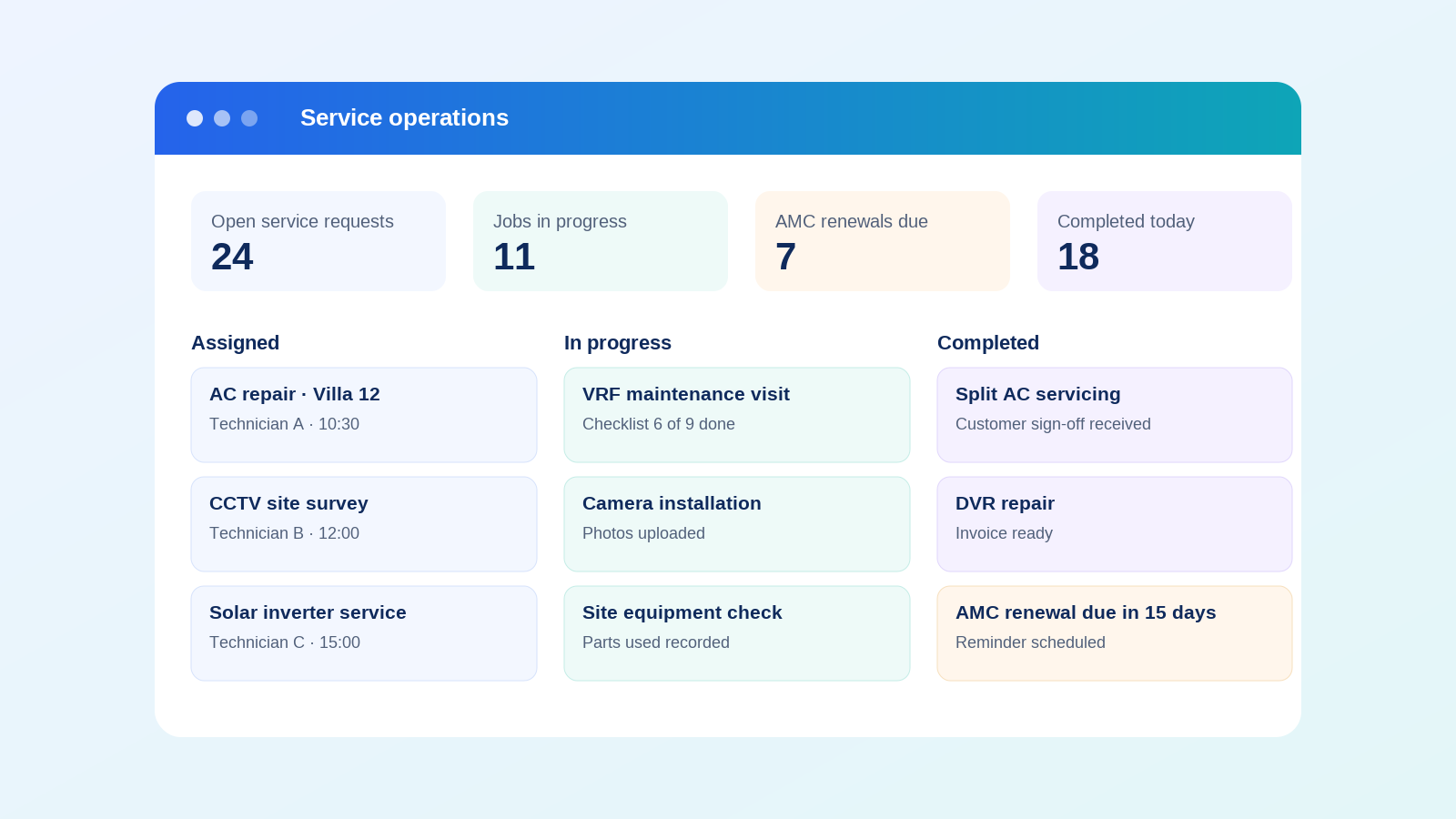
In practice, the office creates or receives a job, assigns it to a technician, and the technician sees it on a phone. The technician updates progress, records parts and photos, and closes the job. The office sees the update straight away, and the customer history is saved for the next visit.
How is it different from CRM and project management software?
- A CRM tracks leads and customer conversations, but it does not schedule technicians, issue job cards or track AMC visits.
- General project management software tracks tasks and deadlines, but it does not understand service requests, equipment history, spare parts or recurring maintenance.
- Field service industry software combines parts of both and adds what on-site work needs: work orders, technician scheduling, a field mobile app, contracts and billing.
What does it look like in different businesses?
- An AC company logs a breakdown call, assigns the nearest qualified technician and records the gas refill and parts used.
- A CCTV installer schedules a site survey, then an installation job, then yearly maintenance visits under an AMC.
- A solar company follows an enquiry through a site visit, quotation, installation and later service requests.
- A construction contractor allocates crews to several sites and tracks each job to completion.
- An equipment maintenance team receives maintenance requests, issues work orders and keeps a service record for every machine.
Why Do Field Service Businesses Need Specialized Software?
Field service businesses need specialised software because their work is spread across locations, people and time. Spreadsheets and phone calls cannot show, in one view, who is going where, what is pending and what is due for renewal. The following seven problems appear in almost every growing service company.
Difficulty Managing Multiple Service Requests
When requests come through calls, WhatsApp messages and walk-ins, some are written down and some are not. Two people may take the same request, or nobody may follow up on one. A central service request list gives each request an owner, a status and a priority.
Technician Scheduling and Assignment Problems
Manual allocation causes double bookings, long travel between jobs and uneven workloads, where one technician is overloaded while another has gaps. Without a shared view of availability, the dispatcher decides from memory. Our guide to technician scheduling software explains this problem in more detail.
Lack of Job Tracking and Visibility
Managers need to know which jobs are assigned, ongoing, pending and completed. If the only way to find out is to call each technician, delays are noticed late and customers are updated late.
Poor Customer Information Management
Customer details, site addresses, equipment and past visits are often split across phone contacts, notebooks and old messages. A technician arriving without the history repeats diagnoses and asks the customer the same questions again.
AMC and Maintenance Tracking Challenges
An AMC (annual maintenance contract) involves recurring visits, a validity period and a renewal. Missing a scheduled visit hurts the customer relationship, and missing a renewal follow-up loses repeat revenue. Tracking these dates by hand depends on someone remembering.
Manual Quotations and Billing
When quotations and invoices are prepared in separate files, the work done, the parts used and the amount billed can drift apart. Disconnected records also make it hard to see which quotations were approved and which payments are pending.
Communication Gaps Between Office and Field Teams
Without centralised job information, instructions travel through calls and chat threads, and updates reach the office late. A single job record that both sides can see keeps instructions, notes and status in the same place.
12 Essential Features to Look for in Field Service Industry Software
The twelve features below work as a buyer’s checklist. Not every business needs every one on day one, and capabilities vary between products, so treat this as a list of questions to ask during evaluation rather than a promise about any single tool.
1. Customer and Lead Management
This feature stores enquiries, customer profiles, contact details and follow-ups. It matters because a lead that is not followed up is revenue lost before the job begins. For example, a solar company can log each rooftop enquiry, set the next follow-up date and convert the lead into a quotation. See how a sales CRM fits into a service workflow.
2. Service Request Management
Service request management records every customer request with its type, urgency and status. It stops requests from being forgotten and helps managers see what is waiting. An AC company, for instance, can separate urgent breakdown calls from routine servicing requests.
3. Technician Scheduling and Assignment
This shows technician availability and lets managers assign jobs by skill, area and workload. Service scheduling software reduces double bookings and idle gaps. A CCTV firm can send its installation crew to one site while a separate technician handles a repair elsewhere. Good technician management software also keeps profiles and skills in one place.
4. Work Order and Job Card Management
A work order is the record of a job: customer, site, task, assignee, status, checklist, parts and completion notes. Digital work orders replace paper job cards that get lost or filled in later. Work order management software lets a plumbing or electrical business create, assign, track and close each job in one flow. See the work order management page for an example.
5. Mobile Access for Field Technicians
A field service mobile app gives technicians their jobs, customer details and history on a phone, and lets them record updates on site. It removes end-of-day paperwork and gives the office real status. For example, an HVAC technician can note the unit model, attach photos and collect the customer’s confirmation at the site. Read more about the technician mobile app.
6. Job Status and Progress Tracking
Status tracking shows which jobs are assigned, ongoing, pending or completed. It lets managers spot delays early and answer customer calls with facts. A construction contractor running several sites can see which jobs are finished without phoning each site supervisor. This is the everyday value of job management software.
7. AMC and Preventive Maintenance Management
This feature tracks contract dates, covered equipment, scheduled visits and renewals, and creates preventive maintenance visits in advance. It protects recurring revenue and keeps service promises visible. A CCTV or AC company can see which contracts expire in the next 60 days and plan renewals. AMC management software of this kind is shown in AMC and warranty tracking.
8. Inventory and Spare Parts Management
Inventory management tracks spare parts and materials in stores and vans, and links parts to the jobs that use them. It reduces repeat visits caused by missing parts. An AC service team can set minimum levels for capacitors and sensors and see low stock before a technician is stuck at a customer’s door. Explore spare parts inventory tracking.
9. Quotation and Invoice Management
This covers estimates, customer approvals, invoices and payment records. When it is connected to the job, the amount billed matches the work done. A solar installer can send a quotation, record approval and raise an invoice from the same customer record. Learn about quotation and invoicing software.
10. Customer Service History
Service history keeps every past job, note, part and photo against the customer and equipment. A technician visiting a faulty recorder sees what was repaired last time, which speeds up diagnosis and supports warranty decisions. Asset and equipment records make this possible.
11. Reports and Business Analytics
Reports turn daily records into numbers: jobs completed, pending payments, technician workload, AMC renewals due. They help owners decide where to add capacity or follow up. Ask which reports come built in and whether your own questions can be answered. See reporting software for service businesses.
12. Multi-Team and Multi-Location Management
Growing businesses run several teams, branches or service centres. The software should separate teams, share customer records where needed and give owners a combined view. An industrial maintenance company with two service centres, for example, should assign jobs within each centre and still report across both.
How Field Service Industry Software Improves Business Operations
Field service industry software improves service operations management by replacing scattered records with one shared system. The practical benefits show up in ten areas.
- Centralised business operations: requests, jobs, customers, contracts and invoices live in one system instead of five.
- Better technician coordination: the dispatcher sees who is free, and technicians see what is assigned to them.
- Organised job scheduling: planned visits and urgent calls are visible on the same schedule, so one can be moved without breaking the others.
- Improved service request handling: every request has an owner and a status, so nothing is forgotten.
- Better job visibility: owners see assigned, ongoing, pending and completed work without chasing updates.
- Reduced manual administrative work: details are entered once and reused for the job card, the quotation and the invoice.
- Organised customer records: addresses, equipment and visit history are available before the technician leaves.
- Better maintenance planning: AMC and preventive visits are scheduled ahead, not after a complaint.
- Improved inventory coordination: parts used on jobs are recorded, so restocking follows real consumption.
- Better operational decisions: reports show where jobs stall, which contracts are due and where workload is uneven.
The results depend on how consistently the team uses the system. Software does not replace process discipline, but it makes good process far easier to follow. For a broader introduction to the discipline behind it, read what field service management is.
Which Industries Benefit from Field Service Industry Software?
Any business that sends people to customer sites benefits, but the priorities differ. The sections below show what matters most in five common industries.
AC and HVAC Service Businesses
AC and HVAC companies handle installation and repair requests all day, often with seasonal peaks in summer. Technician scheduling must match skill to the unit, such as split ACs, VRF systems or chillers. AMC visits need to be planned ahead, and spare parts such as capacitors and PCBs need to be on the van. The most valuable features are scheduling, AMC tracking and parts linked to jobs. See the HVAC field service software page and the guide to choosing AC service management software.
CCTV Installation and Maintenance Companies
CCTV businesses work in stages: site inspection, quotation, installation, handover and then yearly maintenance. Each stage needs its own job record, the right technician and a note of the cameras and recorders installed. Maintenance contracts and customer service history matter because the same site returns for service. The key features are job tracking, AMC visits and equipment history. Explore CCTV software.
Solar Installation and Service Businesses
Solar firms win business through enquiries and site visits, so lead follow-up is central. After the quotation come installation coordination, commissioning and later service requests for inverters or panels. Maintenance activities such as panel cleaning and performance checks recur. The key features are lead management, quotations, installation job tracking and service request handling. See solar software.
Construction and Contracting Businesses
Construction contractors allocate work across multiple sites at once. They need to assign crews to site-based jobs, follow several projects in parallel, manage field teams and keep equipment maintained. Completion tracking matters because unfinished items delay handover. The key features are work allocation, job status tracking and team management. See construction management software.
Industrial Maintenance and Equipment Service Companies
These teams receive maintenance requests for machines and must coordinate equipment service, issue work orders and allocate the right technicians. A maintenance record per machine shows what was done and when. The key features are work orders, technician allocation, preventive maintenance schedules and service history. Our guide to industrial maintenance management covers this in depth.
Manual Management vs Field Service Industry Software
Manual management works for very small teams, while software becomes valuable as jobs, technicians and contracts multiply. The table compares typical day-to-day activities. Actual capabilities depend on the software you select, so use it as a guide to what to expect and verify each point in a demo.
| Business Activity | Manual Management | Software-Based Management |
|---|---|---|
| Customer Management | Paper and spreadsheets | Centralised digital records |
| Service Requests | Phone calls and messages | Organised service requests |
| Job Assignment | Manual coordination | Centralised job allocation |
| Technician Scheduling | Manual calendars | Digital scheduling |
| Work Orders | Paper job cards | Digital job records |
| Job Tracking | Repeated follow-ups | Centralised job status |
| AMC Management | Manual reminders | Organised contract tracking |
| Inventory | Separate stock registers | Digital inventory records |
| Billing | Disconnected records | Organised quotation and billing workflows |
| Reporting | Manual reports | Digital operational reports |
How to Choose the Right Field Service Industry Software for Your Business
To choose the right field service industry software, define your own workflows first, shortlist products that cover them, and test the shortlist with real jobs. Work through the following ten steps in order.
1. Understand Your Business Requirements
Write down your service types, number of technicians, monthly job volume and the complexity of your operations, such as contracts, parts or multiple branches. A five-technician AC shop and a multi-site contractor need different things.
2. Check the Essential Features
Match the twelve features above against your real pain points. Pick software that solves today’s problems well rather than one with a long list of features you will never open.
3. Evaluate Ease of Use
Both office staff and technicians must find the system easy. If technicians avoid the app, the data in the system will be incomplete and the benefit disappears. Ask a technician to complete a job during the trial.
4. Check Mobile Accessibility
Technicians need job details, customer information and history at the customer’s location. Test the field service mobile app on the phones your team actually uses, and in places with weak signal.
5. Evaluate Automation Capabilities
Look for sensible field service automation: reminders for follow-ups and renewals, scheduled maintenance visits created from contracts, and job details reused in quotations and invoices. Automation should remove repetitive administration, not add settings to manage.
6. Review Reporting and Visibility
Ask to see the dashboards and reports. Can you see jobs by status, technician workload, pending payments and contracts due for renewal? Visibility is what turns records into decisions.
7. Check Customization and Scalability
Your business will change. Check whether you can add technicians, branches, service types and checklists without switching systems, and whether higher plans add what you will need later.
8. Understand Pricing and Support
Ask for transparent pricing, including what each plan includes and how cost scales with users. Ask about onboarding, training and how support is provided. Our pricing page shows how FSMFlow structures its plans.
9. Verify Data Security and Access Controls
The system will hold customer and business information. Ask how access is controlled, whether roles and permissions can be set for office staff and technicians, and how data is protected. Do not accept vague answers.
10. Request a Product Demo Before Deciding
Demos should use your scenarios, not a generic script. Bring a breakdown call, an installation job and an AMC renewal, and ask the vendor to walk through each from start to finish.
A practical checklist before you buy
- Can it handle our service types, such as repair, installation and AMC visits?
- Can we create, assign and close a work order in a few steps?
- Does the technician app work on our phones and at our sites?
- Can we track AMC contracts, visit schedules and renewals?
- Can we link spare parts to jobs and see stock levels?
- Can quotations and invoices be created from the same customer and job record?
- Which reports are included, and can we see technician workload?
- Can it support more technicians and branches as we grow?
- What are the pricing, onboarding and support terms?
- How are roles, permissions and customer data protected?
- Did the vendor run a demo with our own scenarios?
Common Mistakes to Avoid When Selecting Field Service Software
- Selecting software based only on price. A cheap tool that your team avoids costs more than a suitable one that they use.
- Ignoring technician mobile requirements. If the app is slow or confusing, updates will not reach the system.
- Choosing software with unnecessary complexity. Features you do not need slow down daily work and training.
- Not checking actual work order workflows. Ask to see a full job from request to invoice, not a feature tour.
- Ignoring AMC and recurring maintenance requirements. If contracts matter to you, test contract setup, visit scheduling and renewals.
- Not evaluating reports and visibility. Confirm that the reports you will actually use exist.
- Failing to consider business scalability. Check that the software can grow with more technicians, branches and services.
- Not requesting a product demonstration. Choosing from a website alone leaves workflow gaps hidden until after purchase.
Why Consider FSMFlow for Field Service Operations?
FSMFlow is field service management software built for Indian service businesses, including AC and HVAC, CCTV, solar, construction and general service teams. It is positioned as a field service management solution, not an ERP. Based on the capabilities described on the FSMFlow website, the table below maps each to a practical problem.
| Business Problem | FSMFlow Capability | Practical Example |
|---|---|---|
| Scattered enquiries and follow-ups | Sales CRM and lead pipeline | A solar firm tracks each enquiry and its next follow-up |
| Requests and jobs lost in chats | Work orders and job tracking | An AC company logs a breakdown call and tracks it to completion |
| Uneven technician workload | Technician scheduling and assignment | A CCTV installer assigns crews by availability |
| Office unaware of site progress | Technician mobile app with photos and customer sign-off | A technician records parts and photos at the site |
| Missed maintenance visits and renewals | AMC contracts, warranty tracking and renewal reminders | An HVAC team sees contracts expiring soon |
| Parts missing at the customer site | Inventory with warehouse and van stock, linked to jobs | A maintenance team sees what each van carries |
| Disconnected quotes and invoices | Quotations, invoices and payment tracking | A contractor invoices from the job record |
| No view of business performance | Reports on jobs, revenue, technicians and AMC | An owner reviews pending payments weekly |
Some capabilities, such as AMC tracking, inventory with van stock and technician reports, belong to the Growth plan, and multiple branches belong to the Enterprise plan. Confirm exactly what each plan includes during a demo. You can explore the service business management software page to see how the modules fit together.
Frequently Asked Questions
What is field service industry software?
Field service industry software is a business system that helps companies with on-site work manage service requests, technicians, jobs, customers, contracts, spare parts and billing in one place. It connects the office with technicians in the field, so everyone works from the same job information.
Who needs field service industry software?
Any business that sends people to customer sites needs it once phone calls and spreadsheets stop keeping up. Typical users are AC and HVAC service companies, CCTV installers, solar installation firms, electrical and plumbing contractors, construction contractors and equipment maintenance teams.
What are the main features of field service industry software?
The core features are customer and lead management, service requests, technician scheduling, work orders, a mobile app for technicians, job status tracking, AMC management, inventory, quotations and invoices, service history, reports and multi-location support. Which ones you need depends on how your business works.
How does field service software help manage technicians?
It shows who is available, who is already booked and what each technician is working on. Managers assign jobs by skill, area and workload, and technicians receive job details on their phones. This reduces repeated phone calls and double bookings.
Can field service software manage multiple service locations?
Yes, if the software supports multiple teams, branches or service centres. Check how it separates branch data, shares customer records and reports across locations. FSMFlow lists multiple branches under its Enterprise plan, so confirm this in a demo.
What is the difference between CRM and field service software?
A CRM tracks leads, customers and sales conversations. Field service software also schedules technicians, runs work orders, tracks equipment, manages AMC visits and handles parts and billing for on-site work. Many field service systems include a sales CRM so enquiries can become jobs without re-entering data.
Is field service industry software suitable for small businesses?
Yes, provided it is simple enough for the team to use daily. A small business can start with jobs, technician scheduling and quotations, then add AMC and inventory as it grows. Avoid paying for complexity you will not use.
Can field service software manage AMC contracts?
Yes, if it includes contract records. Look for the units covered, visit schedules, validity dates, automatic preventive maintenance visits and renewal reminders. FSMFlow includes AMC and warranty tracking with renewal reminders on its Growth plan.
How does field service software improve job tracking?
It gives every job one record with a status, so managers see assigned, ongoing, pending and completed work without calling technicians. Technicians update status from their phones, and notes, photos and parts used stay attached to the job.
How do I choose the right field service industry software for my business?
List your service types, team size and must-have workflows, then shortlist software that covers them. Test ease of use, the technician mobile app, AMC handling, reports, support and security. Finally, request a demo using your own real jobs before deciding.
Conclusion – Choose Software That Supports Your Service Business Growth
Structured field service operations make a growing business easier to run. When requests, technicians, jobs, contracts, parts and invoices live in one system, owners spend less time chasing updates and more time serving customers. The right field service industry software gives you visibility over technician work, job progress and recurring maintenance, and it keeps the office and the field team working from the same information.
Choose according to your actual needs: write down your workflows, shortlist products that cover them, test the mobile app with technicians and run a demo with your own jobs. FSMFlow is a solution worth exploring if you run an AC, CCTV, solar, construction or maintenance business and want to move beyond spreadsheets and calls.