How Technician Scheduling Software Improves Service Business Operations
How technician scheduling software helps AC, CCTV, solar and contracting teams assign jobs, avoid clashes and track work, plus the features to look for.
A compressor failure comes in at 11 am. The nearest technician is across the city, another is on leave, and a third has three visits booked that nobody wrote down. The dispatcher starts phoning around. Twenty minutes later the customer is still waiting and two jobs overlap. Technician scheduling software exists to prevent exactly this: it keeps every job, technician and time slot in one shared view, so assigning work becomes a decision instead of a guess.
This guide explains what technician scheduling software is, the scheduling problems it solves, how it improves service business operations, the features that matter, and how AC, CCTV, solar and contracting businesses use it.
What Is Technician Scheduling Software?
Technician scheduling software is a tool for planning which technician does which job, when and where. It holds technician profiles, skills, availability and workload next to the jobs waiting to be done, so the person scheduling can spot conflicts before they happen. It is often a core part of wider field service management software, and you may also see it called field technician scheduling software, field service scheduling software or job scheduling software. It differs from generic employee scheduling software, which plans shifts and hours, because it plans jobs, skills and travel.
In practice, it works like this:
- A job is created with the customer, site, priority and preferred time.
- The scheduler sees each technician’s skills, leave and current workload.
- The job is assigned and appears on the technician’s phone.
- Status updates flow back to the office as the work progresses.
Any business that sends people to customer sites needs it once scheduling lives in one person’s head: AC and HVAC firms, CCTV installers, solar companies, electricians, plumbers and maintenance contractors.
Manual scheduling vs automated scheduling
Manual scheduling runs on phone calls, chat messages, notebooks and whiteboards. Automated, or software-based, scheduling keeps a shared schedule that updates as jobs change. The word “automated” covers a range: some tools suggest assignments on their own, while others show the right information and leave the final choice to the dispatcher. Both beat the whiteboard, but ask which one you are buying. Technician dispatch software focuses on assigning urgent work right now, while scheduling plans ahead; our guide to field service dispatch software explains the difference.
Common Technician Scheduling Challenges Faced by Service Businesses
- Manual job allocation: an AC dispatcher phones three technicians to find who can take a breakdown call, and the answer is already stale.
- Scheduling conflicts: a CCTV survey is booked at the same hour as an installation for the same technician.
- Uneven workloads: one technician has six visits while a colleague has two, because nobody could see the totals.
- Missed customer appointments: a slot promised on the phone is never written down, and the customer calls again.
- Delays in job completion: a solar installation stalls because the site inspection was never scheduled.
- Lack of real-time job updates: the office cannot tell whether a job is finished without calling the technician.
- Multiple service locations: a contractor with crews at several sites cannot see who is where.
- Poor communication between office and technicians: instructions are given verbally, so the technician arrives without the unit details or the earlier fault history.
These are information problems, not skills problems, and they grow with every technician you add.
How Technician Scheduling Software Improves Service Business Operations
Used consistently, scheduling software improves daily operations in eight practical ways.
Automated Technician Assignment
Good assignment follows three facts: skills, availability and workload. Software puts all three on one screen so a VRF fault goes to the VRF engineer, not just the closest person. Where a tool supports automatic suggestions, that speeds things up further. Where it does not, the dispatcher still decides, but with the facts in front of them.
Better Job Scheduling and Planning
A daily and weekly view lets you plan ahead instead of reacting. A simple routine works well: confirm tomorrow’s jobs each evening, place planned work such as AMC visits and installations first, and keep room for breakdown calls. That is the core of how to schedule field service technicians without constant firefighting.
Improved Technician Productivity
Productivity improves when technicians spend less time waiting for instructions and less time on end-of-day paperwork. With the job details already on the phone, the technician can go straight to work. We do not quote percentage gains here, because results depend on how consistently the team records work.
Real-Time Job Status Tracking
Jobs move through assigned, en route, in progress and completed as the technician updates them. The office can see open, ongoing and finished work at a glance, and a customer asking “where is he?” gets an answer from the screen.
Reduced Scheduling Conflicts
When everyone books against one shared schedule, double bookings show up before the day starts. Marking leave and days off also stops jobs being assigned to someone who is not there.
Improved Customer Appointment Management
Service appointment scheduling software gives every request a record, a priority and a time window, so fewer appointments slip through. Staff can offer a realistic arrival time because they can see what the technician already has on.
Better Workload Distribution
Workforce scheduling software that shows jobs per technician per day lets a manager rebalance before one person is overloaded and another is idle. This also makes performance reviews fairer, because they rest on records.
Faster Communication Between Office and Field Teams
When job information sits in one place, there are fewer repeat calls and manual follow-ups. Changes reach the technician’s phone, and updates reach the office without anyone asking.
Essential Features to Look for in Technician Scheduling Software
Whether it is sold as technician management software or service technician management software, a good tool should cover this list:
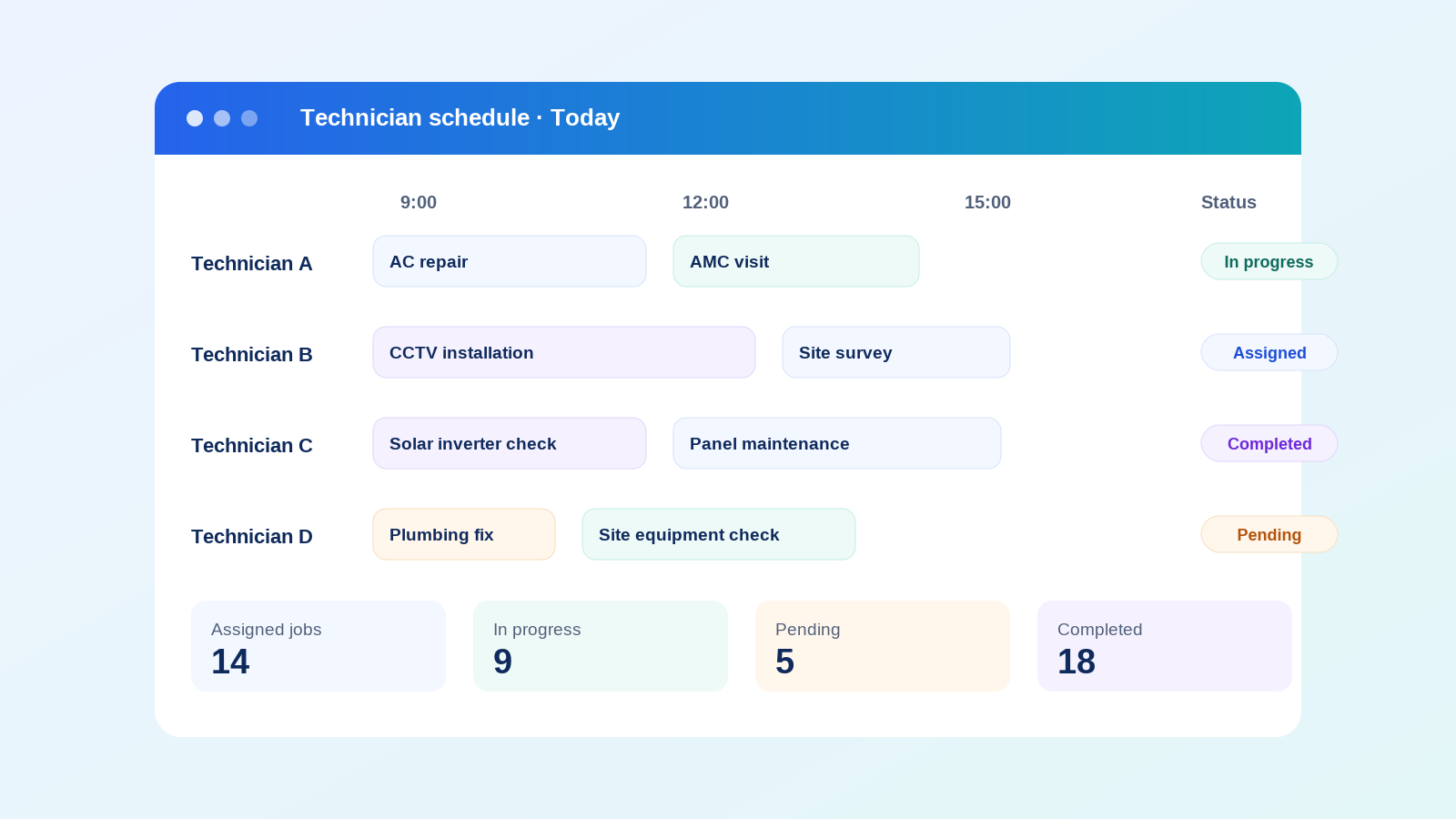
- Centralized scheduling dashboard: one place to see all jobs and technicians, so nothing depends on memory.
- Technician availability management: leave, days off and working areas, so jobs go to people who can actually take them.
- Job assignment and dispatch: assign by skill and workload, and change plans quickly when an emergency arrives.
- Calendar-based scheduling: a day and week view that makes gaps and double bookings obvious.
- Mobile app access: technicians see jobs and update status from the field. See our guide to mobile field service management software.
- Service request management: requests are logged and turned into jobs. See service request management.
- Job status updates: live status from assignment to completion.
- Customer information management: contact details, site and equipment history, linked to each job.
- Work order and job card management: checklists, parts and photos on every job. See work order management software.
- Performance and productivity reports: jobs completed and workload per technician, built from recorded work.
Manual Technician Scheduling vs Software-Based Scheduling
| Area | Manual (calls, chats, whiteboards) | Scheduling software |
|---|---|---|
| Job assignment | Decided by phoning around | Assigned from a shared view of skills and workload |
| Technician availability | Remembered, or checked by calling | Leave and days off recorded on the schedule |
| Scheduling conflicts | Found when two jobs clash on the day | Double bookings visible in advance |
| Appointment tracking | Slots noted in chats or notebooks | Every appointment on a calendar |
| Job status updates | Found by asking the technician | Updated from the technician’s phone |
| Team communication | Verbal instructions and repeated calls | Job details held in one record |
| Workload management | Unclear until someone complains | Jobs per technician visible each day |
| Reporting and performance | Compiled by hand, if at all | Built from recorded jobs |
How Different Service Industries Benefit from Technician Scheduling Software
AC and HVAC service businesses
AC teams juggle installation appointments, breakdown calls, preventive maintenance and AMC (annual maintenance contract) visits at once, with demand peaking before summer. Skills matter, since split, VRF and chiller work differ. Grouping AMC visits by area saves travel. See HVAC field service software and our guide to HVAC technician management.
CCTV installation companies
Installation crews, site surveys and maintenance visits are spread across many customer locations. A shared schedule keeps a survey from clashing with an installation and shows which crew can take a service call. See CCTV software.
Solar installation companies
Solar work runs through site visits, installation days, inspections and later maintenance. Scheduling each stage on one calendar stops a project from stalling between steps. See solar software.
Construction and maintenance contractors
Contractors assign crews to sites and handle follow-up maintenance calls at the same time. A single view of who is where helps coordinate site-based jobs and project-related tasks. See construction management software.
How to Choose the Right Technician Scheduling Software
- Business size and team requirements: a small team needs jobs, a schedule and a phone app. A larger one also needs branch views and roles. Buy for the team you will have soon.
- Ease of use: if the office or technicians need long training, adoption will stall. Let a technician try it.
- Mobile accessibility: test the app on real phones, in the places your team works.
- Scheduling flexibility: can you move a job quickly when an emergency comes in?
- Automation capabilities: ask what is automatic, such as notifications or suggestions, and what is still manual.
- Real-time updates: does the office see status changes as they happen?
- Integration capabilities: ask plainly what it connects with, and what it does not.
- Scalability: will it cope with more technicians, customers and locations?
- Data security: ask about role-based access, backups and whether you can export your data.
- Pricing and customer support: understand how pricing is calculated, often per technician, and what onboarding and support are included.
Run a trial with a real week’s jobs, including one emergency. For smaller teams, our guide to field service software for small businesses adds a checklist.
Why Service Businesses Should Consider FSMFlow
FSMFlow is field service management software for Indian service businesses, built first for AC and HVAC teams. Here is how its scheduling and job features address the problems above, based on what the product offers today:
- Technician profiles: name, role, service area and skills such as split AC, VRF or chiller on one record, so the right person is picked for the job.
- Schedule grid: each technician’s jobs on a weekly view, with gaps and double bookings visible before the day starts.
- Availability and workload: leave and days off recorded, and jobs per technician shown so you can rebalance.
- Work orders: jobs with priority, time window, checklist, parts and photos, assigned to a technician and sent to their phone.
- Status and team view: jobs move from assigned to en route, in progress and completed, and the team view shows who is on a job, travelling or free.
- Reports: jobs completed and workload per technician, from the work already recorded.
You assign each job with skills, leave and workload in front of you. FSMFlow does not describe automatic assignment, so ask about that in a demo if it matters to you. For the details, see employee and technician scheduling, the field service app and reporting.
Frequently Asked Questions
What is technician scheduling software?
It is software for planning which technician handles which job and when. It keeps technician skills, availability and workload alongside the job list, so assignments are made with full information.
How does technician scheduling software work?
Jobs are created with customer, site and priority. A scheduler assigns them to technicians, who see them on their phones and update status. The office sees progress without calling.
What is the best software for managing field technicians?
No single tool suits everyone. Look for scheduling, a technician mobile app, job tracking and reports, then trial two or three options with your own jobs.
Can technician scheduling software manage multiple technicians?
Yes. Managing several technicians at once is its main purpose. You can see who is available, who is on a job and how loaded each person is.
How does scheduling software improve technician productivity?
It cuts waiting, repeated calls and paperwork, because job details reach the technician’s phone and updates flow back automatically. Results depend on consistent use.
Can small service businesses use technician scheduling software?
Often, yes. A small team can start with jobs, a schedule and a phone app, and add more as it grows. Choose a tool that is simple and priced for your size.
What is the difference between technician scheduling and field service management software?
Technician scheduling plans who works when. Field service management software is broader and also covers customers, quotations, invoices, inventory, contracts and reports. Scheduling is usually one part of it.
What features should I look for in technician scheduling software?
Look for a central schedule, availability management, assignment, a mobile app, job status updates, customer records, work orders and reports. Then check ease of use and support.
Conclusion
Organised technician scheduling keeps jobs from clashing, appointments from slipping and technicians from being overloaded. Technician scheduling software does this by putting jobs, people and status in one place, so the office stops chasing updates and the field team stops waiting for instructions.
FSMFlow combines scheduling with work orders, a technician app and reports for service businesses. To see it with your own team and jobs, book a FSMFlow demo.